
Veebs
VBS CORP LLCShopping
1.9289.00 Reviews
- Version
- 26.1.13
- Installs
- 10.00K
- Age Rating
- Everyone
Screenshots
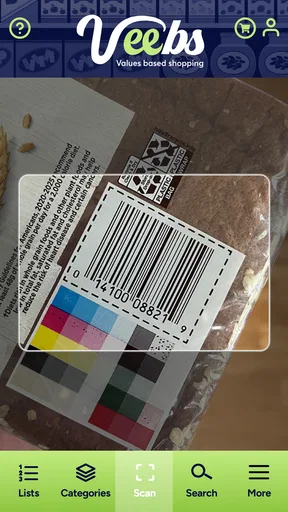
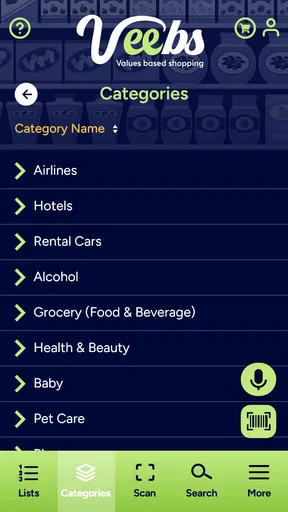
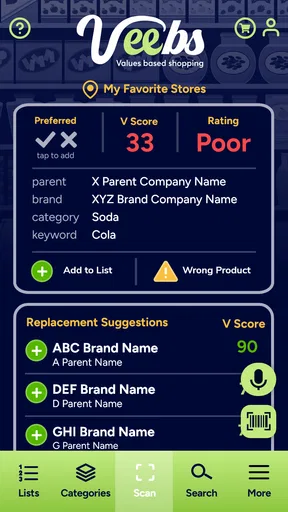
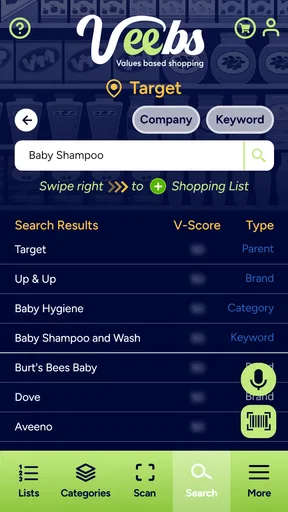
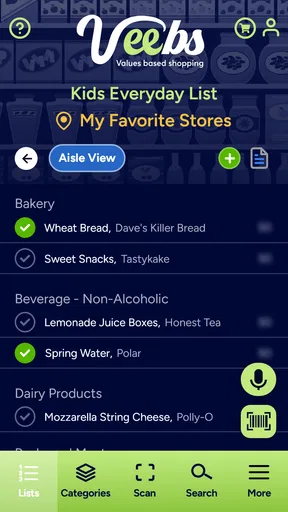
Our Review of Veebs
 Analysis by Appyee
When I’m weighing up a grocery choice in a shop aisle, I want a scanning app to help me make a decision without turning a quick stop into a research project. Veebs is a shopping app from VBS CORP LLC, built around everyday grocery shopping and scanning. That focus makes it most appealing when I have a specific product in hand and want to use my phone as part of choosing what to buy.
Where a connection shapes the experience
Scanning is useful only if the app can turn the scan into information I can act on. In practice, I’d treat Veebs as a tool to consult while shopping, not as a replacement for checking a label or comparing products myself. A product barcode is a starting point: if the result doesn’t appear or takes too long to load, I still need to make the decision using the packaging and my own priorities.
That matters most in a busy aisle. If I’m holding a basket, juggling a list, and trying to compare two similar items, a scan that needs a reliable connection can add friction rather than save time. I’d use it when I can pause for a moment, rather than assuming every scan will give an immediate answer in every shop.
A useful routine for grocery trips
My practical approach would be to decide what I’m trying to learn before opening the scanner. For example, if I’m choosing between two pantry staples, I’d scan one, check the app’s result, then scan the other and compare them on the same basis. That is more dependable than scanning a trolley full of products and expecting the app to organize every decision for me.
It also helps to keep the packaging in view while scanning. If a barcode is damaged, covered, or hard to position under the camera, turning the item around or checking the label directly is often faster than repeatedly trying the same angle. I’d regard the scan as a convenience, not as a reason to put off a straightforward decision.
Who is likely to get the most from it
Veebs makes the most sense for shoppers who already use their phones in grocery stores and want scanning to be part of that routine. It may be especially handy for someone who likes to check products one at a time before adding them to a basket. If you only need a basic shopping list or prefer to make choices from labels on the shelf, a standard notes app and a quick read of the packaging may be simpler.
It is also worth separating grocery scanning from grocery ordering. A scanning-focused app is not automatically a substitute for a supermarket’s own app, where the main job is browsing stock, arranging a delivery, or managing a store order. I’d choose the tool based on the task: Veebs for a scan-led check, a retailer app for retailer-specific shopping, and a list app if all I need is a reminder of what to buy.
Practical limits to keep in mind
Any scanner depends on getting a readable barcode and a useful result. A product with an awkwardly placed code, unusual packaging, or a code that the app does not recognize can interrupt the flow. I’d avoid building an important dietary or purchasing decision around a single scan; the physical label remains the sensible backup, particularly when ingredients or other details matter to me.
Connectivity is another part of that trade-off. I would open the app before I reach the aisle and give it a moment to load, rather than waiting until I’m in a crowded spot with poor reception. If a result stalls, I’d try once more after moving somewhere with a better signal, then fall back to the packaging rather than letting a technical pause hold up the whole shop.
Veebs is free to download, though it includes in-app purchases priced from $0.99 to $8.99 per item. I’d start with the free experience and only consider a purchase if I had a clear reason to do so. That keeps the decision grounded in how often I actually scan groceries, rather than paying for possibilities I might not use.
Using Veebs on an ordinary shopping trip
Imagine I’m picking up breakfast supplies after work and can’t remember which of two products I usually buy. I can take out my phone, scan one item, and use whatever the app shows to inform my choice. If the connection is slow, I still have the package in my hand, so I can read its label and move on. This is the kind of low-stakes, one-product check where a mobile scanner can be useful without becoming the whole shopping process.
Making scans work for you
A small habit can make the experience less frustrating: scan before putting an item in the basket, while the barcode is easy to reach. For products you are comparing, check each one in turn and keep the question consistent. That avoids the common trap of collecting bits of information without knowing what you want them to tell you.
For a larger shop, I would not assume that scanning every item is the fastest route. I’d reserve it for unfamiliar products or choices where a closer look could change what I buy. Familiar staples can go straight into the basket, while the app stays available for the decisions that actually need extra attention.
What its audience feedback suggests
The app has an average rating of 1.9 from around 390 ratings, with about 289 written reviews, so the overall reception is mixed and gives me reason to keep expectations measured. That does not tell me how every shopper’s experience will go, but it does make a cautious first try more sensible than relying on it as an essential part of every grocery run.
It has passed 10,000 installs and is rated Everyone, which makes it accessible to a broad audience. The current version is 26.1.13, and the app was released on December 27, 2022. Those details help identify the product, but what matters day to day is whether the scanning flow and results fit the way you shop.
Getting started and setting expectations
First thing’s first, downloading Veebs is a breeze. Head over to your app store, type in the name, and hit that download button. Once you’re in, the app greets you with a straightforward interface that’s super user-friendly. No complex navigation here—just a clean, intuitive design that gets you where you need to go.
The app requires iOS 11 or later. Before relying on it during a trip, I’d open it at home or before leaving the store entrance, so I can get familiar with the basic flow and see how it behaves on my device. That simple trial is also a good way to decide whether scanning genuinely saves me effort compared with reading the package myself.
What scanning can and cannot settle
So, what’s the main attraction? It’s all about the text transformation feature. You type something out, and Veebs offers you a plethora of quirky, humorous alternatives. The app uses its clever algorithms to switch up your words while keeping the vibe of your original message intact. Whether you’re aiming for sarcasm, wit, or just plain silliness, Veebs delivers.
It’s like having a comedian in your pocket, ready to spice up your conversations on demand. And trust me, once you start, it’s hard to stop. The giggles are real.
Finding a comfortable mobile workflow
Beyond just spicing up your texts, Veebs offers a few other nifty features. For instance, you can save your favorite text transformations for later use. Handy, right? There’s also an option to share your hilarious creations directly on social media or through your messaging apps. No more screenshotting and cropping—Veebs makes it seamless.
Plus, the app frequently updates its database of language transformations, so you’re always getting fresh content. It’s like it knows just what we need to keep our chats lively.
For shopping, I’d keep the phone use deliberately brief: open the app, scan a product, check the result, and decide whether it answers the question I had. That is a better fit for a grocery aisle than prolonged browsing, especially when there are other people waiting to reach the shelf. If my signal is unreliable, I’d do the comparison by reading the packaging rather than repeatedly refreshing or rescanning.
Choosing it over familiar alternatives
Now, let’s talk about why Veebs has become my go-to app for livening up conversations. For starters, the app is incredibly lightweight and doesn’t hog your phone’s resources. It’s smooth, responsive, and doesn’t crash—something I value immensely in any app.
Moreover, the sheer variety of text transformations is impressive. From subtle tweaks to full-blown comedic rewrites, the app keeps you entertained. It’s like having a little creativity boost whenever you’re feeling a bit meh about your usual texts.
For grocery decisions, the relevant comparison is with a store’s own shopping app, a general product lookup tool, or simply reading the label. A retailer’s app may suit someone who wants store-specific ordering; a plain list is quicker for remembering items; and the package is the most direct source for details printed on it. Veebs is worth trying when its scanning approach matches the question in front of you, not just because it is another app to keep on your phone.
When the app is not the right fit
Of course, no app is perfect. While Veebs is mostly a joy to use, there are moments when the humor might not hit the mark for everyone. Humor is subjective, after all. Sometimes, the transformations might feel a tad forced or not quite align with your intended message. But hey, that’s half the fun. You get to play around and find what works best for you.
Also, while the app is free to use, there are occasional ads. They’re not too intrusive, but it’s something to keep in mind if you’re not a fan of ads popping up now and then.
In a grocery setting, I would skip a scanning app if I need guaranteed access to an answer at every stop, if I’m in a hurry, or if the information I need is already clearly printed on the product. I’d also avoid treating a scan as the final authority for a consequential dietary choice. The app is better approached as a helpful extra than as a substitute for careful label reading.
My connectivity verdict
So, is Veebs worth downloading? Absolutely. It brings a fresh, fun twist to everyday communications and is a fantastic way to inject some humor into your life. Whether you’re a meme enthusiast or just someone who enjoys a good laugh, Veebs offers something delightful. It’s easy to use, packed with features, and constantly evolving. Give it a whirl and see how it transforms your chats into something magical.
Ready to elevate your texting game? Download Veebs and let the fun begin!
My recommendation is to try it on a normal grocery trip where a slow result would be an inconvenience, not a serious problem. That gives you a realistic sense of whether the scanner fits your routine and whether you prefer it to checking packaging or using a retailer’s app. If it makes a few product decisions easier, keep it in your shopping toolkit; if connection delays or the scan flow get in the way, there is no need to make it your default.
Verdict
Strengths of Veebs
- Easy-to-use interface for quick navigation.
- Customizable settings enhance user experience.
- Regular updates with new features.
- Compatible with most devices and systems.
- Efficient customer support response time.
Limitations of Veebs
- Occasional bugs can disrupt usage.
- Some features require in-app purchases.
- High battery consumption on older devices.
- Limited offline functionality.
- Notifications can be overwhelming.
Similar Picks in This Category
View All
SHEIN-Shopping Online
Roadget Business PTE. LTD.4.8

Amazon Shopping
Amazon Mobile LLC4.4


Mercado Libre: Compras online
Mercado Libre4.8

Wish: Shop and Save
Wish US Holdings LLC4.7

Alibaba.com - B2B marketplace
Alibaba Mobile4.4
Frequently Asked Questions
What is Veebs and what does it offer?
Veebs is a versatile app designed to enhance your online experience by providing advanced web browsing features. It offers tools like ad blocking, privacy enhancements, and customizable browsing settings. It's ideal for users seeking a seamless and secure internet experience on both Android and iOS platforms.
Is Veebs compatible with all devices?
Veebs is specifically designed for Android and iOS devices. It supports a wide range of smartphones and tablets, ensuring compatibility with most modern devices. However, it's always recommended to check the app's requirements on the respective app store to ensure full compatibility with your device.
How does Veebs ensure user privacy?
Veebs prioritizes user privacy by incorporating features such as encrypted browsing and automatic cookie management. The app doesn't track your browsing history or share your data with third parties, ensuring a secure and private internet experience. Users can customize privacy settings to suit their needs.
Are there any subscription costs or in-app purchases in Veebs?
Veebs offers a free version with essential features. However, for users seeking advanced options, there are subscription plans available. These plans unlock premium features such as enhanced privacy settings and ad-free browsing. Prices and options can be reviewed within the app or on the app store.
What are the main advantages of using Veebs?
Veebs provides several advantages, including a more secure browsing experience, reduced data usage due to ad blocking, and enhanced speed with faster load times. Additionally, its user-friendly interface makes it accessible for users of all technical levels, providing a smooth and efficient browsing experience.
